PIPELINES
Sales pipeline software your reps will actually update
A drag-and-drop board with stages you define, updating in real time for everyone looking at it.
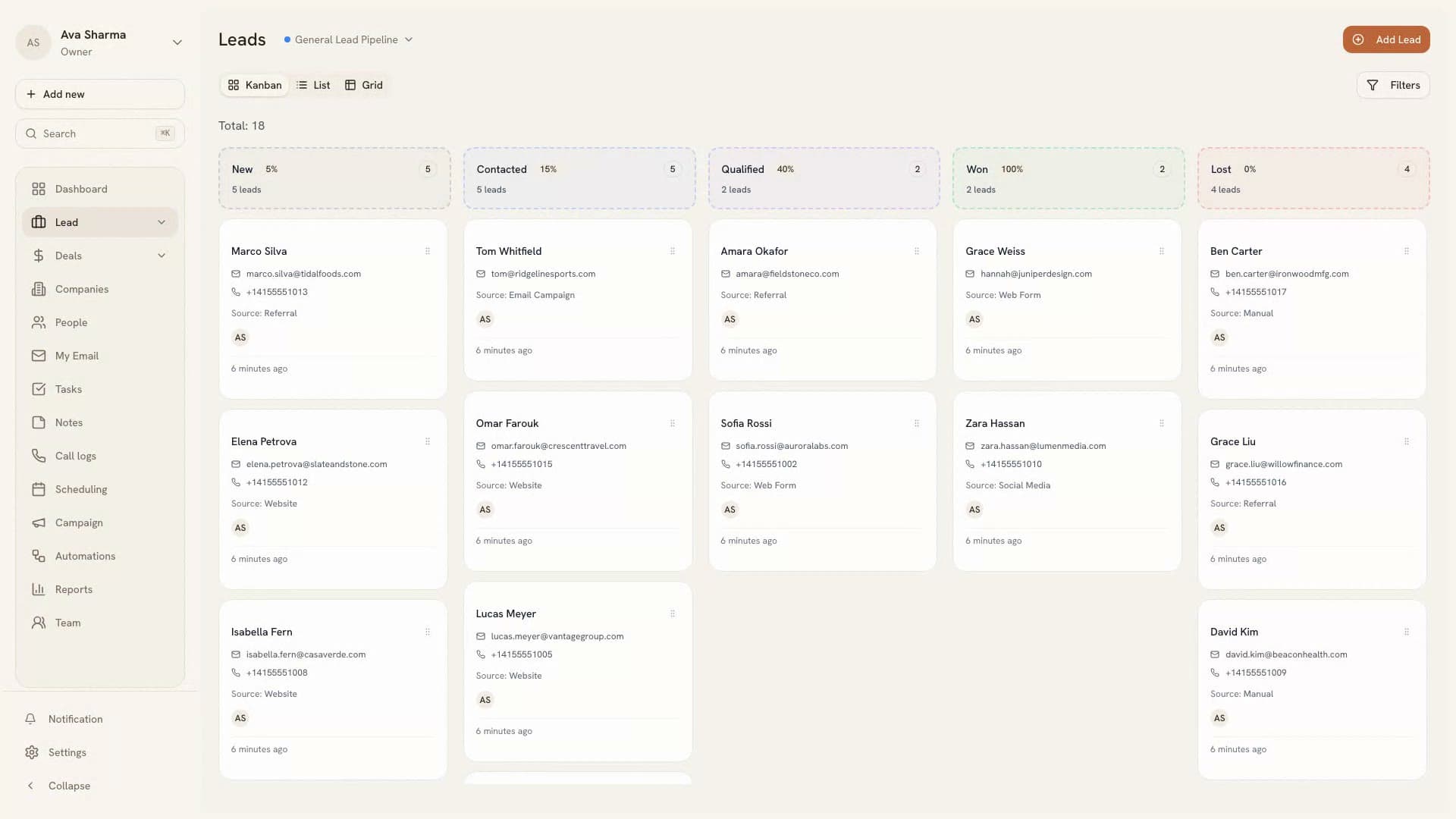
Most sales pipeline software sells you the same drag-and-drop board. What separates the teams whose pipeline is useful from the teams whose pipeline is decoration isn't the software — it's whether the stages mean anything, and whether the reps trust the board enough to keep it current.
A pipeline is a forecasting instrument first and a to-do list second. When it's accurate, three questions get answered without a meeting: what's likely to close this quarter, where deals are dying, and which rep needs help before the number is already missed. When it's stale, every one of those answers is a guess, and the guess gets presented to a board as though it were data.
So the useful features aren't the ones that look good in a demo. They're the ones that keep the board honest: stages with exit tests, live updates so nobody works from a stale copy, and a review that happens on the board itself rather than in an exported spreadsheet.
At a glance
Custom stages on every plan
Add, rename, reorder, and remove stages — including on Starter. There's no tier gate on configuring the one screen your team looks at all day.
Separate boards per motion
New business, renewals, and inbound each get their own pipeline with their own stages, filters, and totals, so one motion's numbers never contaminate another's.
Lead and deal pipelines, kept apart
Qualifying people and forecasting opportunities are different jobs. You get both as distinct boards rather than one list pretending to do both.
Kanban, list, or grid
The same pipeline as a drag-and-drop board, a dense list, or a spreadsheet-style grid for bulk edits — whichever fits the task in front of you.
Define stages by exit criteria, not by feeling
A stage name describes where a deal sits. An exit criterion describes what must be true before it can leave. Only the second one survives contact with a pipeline review. The test for any stage definition: could a rep who joined last week read it and decide, without asking anyone, whether a given deal belongs there? If two experienced reps can argue about it, it isn't a stage — it's a mood.
This is why 'Qualified' is the stage that breaks most pipelines. It sounds objective and behaves subjectively. Replace it with something falsifiable — budget owner named and problem confirmed in the customer's own words — and the conversion number downstream of it becomes worth reading for the first time.
- Add, rename, reorder, and remove stages on every plan, including Starter
- Run separate pipelines for new business, renewals, and a second product line, each with its own stages
- Set the probability weighting per stage so the forecast reflects your real close rates rather than a vendor's defaults
- Keep a written exit test per stage and put it in front of reps during the review, not in a document nobody opens
The deals that will never close and never leave
The most expensive deals in any pipeline are the ones that quietly persist: never closed, never lost, absorbing follow-up energy and inflating the forecast. They make the top of the funnel look healthy in the same way a balance sheet full of bad receivables looks healthy — right up until the quarter lands.
The mechanical fix is stage-age limits. Give every stage a maximum dwell time — say fourteen days in Proposal — and filter the board by time-in-stage before each review. Anything past its limit gets exactly one question: what has changed since we last spoke? If the honest answer is nothing, the deal moves back or it closes as lost. Six months of that discipline does more for forecast accuracy than any amount of pipeline software.
The other half is a real loss reason. Closing as lost should ask for a sentence a human wrote. 'Went dark' is a legitimate answer. 'Chose competitor — pricing' is gold. A quarter of honest loss reasons will redesign your qualification stage for you, without a consultant.
Run the review from the board, not a spreadsheet
The moment your pipeline review happens outside the CRM — in an exported sheet, a slide, a document someone updates on Sunday night — the CRM starts drifting from reality, and reps quickly learn which one is the real system of record. They will keep the real one current and let the other rot.
Because Beige boards update live for everyone, the review can happen on the board itself. Filter by owner, stage, value, or close date and work the list in front of the team. Changes made in the meeting are already saved when it ends, which removes the reconciliation step that quietly consumes a manager's Monday.
WORKS WITH
Deals
Every deal carries its value, stage, owner, close date, and complete history — so a review is a reading, not a negotiation.
Contacts & companies
One record per person and per company, with every call, email, note, and deal attached to it — so nobody has to ask what happened with this account.
Reporting
Pipeline value, conversion by stage, velocity, and who's actually closing — from live data, not last week's export.
Questions about pipelines
Can I customise pipeline stages?
Yes — add, rename, reorder, and remove stages on every plan. Most teams start from a six-stage template and adapt it once they've seen where deals actually stall.
Can I have different pipelines for different teams?
Yes. Create separate pipelines with their own stages for new business, renewals, or a second product line. Plan limits govern how many you can run at once; the pricing page has the numbers.
How do I stop deals rotting in a stage?
Filter the board by time-in-stage to surface deals past their dwell limit, and on Enterprise you can automate it — a workflow can flag or reassign anything sitting too long. We wrote up the full approach in our guide to pipeline stages.
How many pipeline stages should I have?
Five to seven for most B2B teams. Below five and the stages are too coarse to show you where deals die; above seven and reps start guessing which of two adjacent stages a deal belongs in, which puts noise into the exact number you built the pipeline to measure.
What's the difference between a lead pipeline and a deal pipeline?
A lead pipeline tracks people you're qualifying — the question is whether there's an opportunity here at all. A deal pipeline tracks confirmed opportunities with a value and a close date. Beige gives you both as separate boards, because mixing them is what makes a forecast unreadable.
Does the board update if a colleague moves a deal?
Yes, immediately, on every plan. Boards are live for everyone with access, so a stand-up doesn't start with everyone refreshing, and two people never quote different numbers from the same screen ten minutes apart.

We're building the CRM that does more and costs less
If your stack feels like five subscriptions duct-taped together, it's time for one workspace.
Start your free trialFree trial — 3 days to look around, 30 days with a card
